
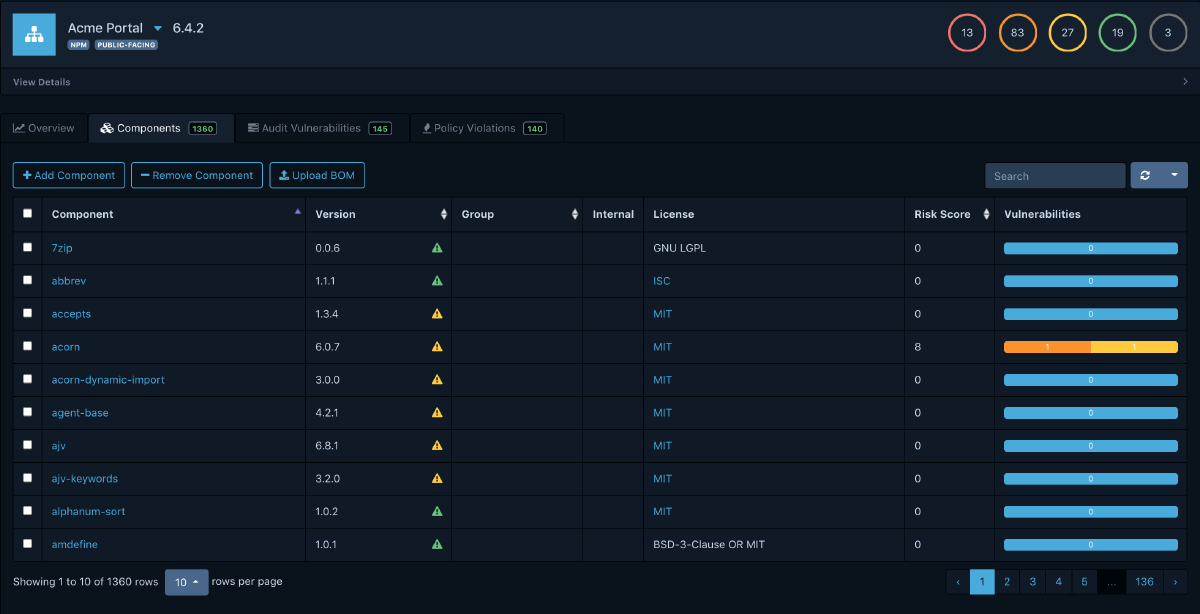
Previously in this series, we explored how to generate SBOMs with Syft and scan them for vulnerabilities with Grype. That workflow is a solid foundation, but it leaves a critical question unanswered: where do all those sbom.json files go, and how do you keep track of vulnerabilities as they evolve over time? What are your options:
- Upload these to some form of storage like an S3 bucket?
- Append these to your packages in your artefact registry?
- Keep them left & right with your CI pipeline logs and outputs?
Dependency-Track#
Enter Dependency-Track a Software Composition Analysis (SCA) tool suite that identifies project dependencies and checks for any known, publicly disclosed vulnerabilities. It consumes your SBOMs, continuously monitors every component for newly disclosed vulnerabilities, and gives you a portfolio-wide view of risk across your entire organization.
Dependency-Track is an OWASP Flagship project and unlike traditional Software Composition Analysis (SCA) tools that perform point-in-time scans, Dependency-Track takes an SBOM-centric approach. You feed it SBOMs, and it continuously re-evaluates every component against multiple vulnerability intelligence sources.
At its core, Dependency-Track is:
- SBOM warehouse: It ingests, stores, and versions CycloneDX (and SPDX) BOMs for every project and version in your portfolio
- Continuous vulnerability monitor: Components are re-analyzed daily against multiple vulnerability databases, so you learn about new CVEs without rescanning your artifacts
- Portfolio risk dashboard: See risk metrics across all projects, identify which applications share a vulnerable component, and prioritize remediation where it matters most
The platform has an API-first design, making it ideal for CI/CD integration. Every action available in the web UI is also exposed through a well-documented REST API.
Deploy your own#
Dependency-Track is licensed under Apache 2.0 which means free to use, modify, and distribute in a commercial setting without royalties. It is a highly permissive, enterprise-friendly license that allows you to incorporate the code into proprietary, closed-source products, provided you include the original license, copyright notices, and documentation of significant changes.
The fastest way to stand up Dependency-Track is with Docker Compose. For more details find the official documentation here for alternative deployment.
---
volumes:
  dependency-track:

services:
  dtrack:
    container_name: dependencytrack
    image: docker.io/dependencytrack/bundled:4.13.6-alpine
    deploy:
      resources:
        limits:
          memory: 12288m
        reservations:
          memory: 8192m
    ports:
      - "8080:8080"
    volumes:
      - dependency-track:/data
    restart: unless-stopped
This container version is the bundled edition which simplifies database deployment and management although I would not use this version in production. It is very good for small-scale and testing purposes. Bring it up with docker compose up -d.
On first launch, the API server will initialize the database and begin mirroring vulnerability data from the National Vulnerability Database (NVD) and other configured sources. This initial mirror can take up to 30 minutes.
The default credentials are admin / admin. Change them immediately on first login.
Dependency-Track follows a three-tier architecture:
- API Server (
dependencytrack/apiserver): A Java-based backend that handles all business logic, vulnerability analysis, SBOM ingestion, and API endpoints. - Frontend (
dependencytrack/frontend): A lightweight web-application that communicates with the API server. - Database: Options are PostgreSQL, MSSQL and MySQL; I prefer
postgrespersonally for no specific reason other than that I know a bit ofpsql
Setting up your own#
After deployment, a few configuration steps will maximize the value you get from Dependency-Track:
Configure vulnerability data sources:
Navigate to Administration > Analyzers and enable the sources relevant to your stack:
- Internal Analyzer (CPE-based matching against NVD): Enabled by default, covers OS-level and firmware components
- OSS Index (Sonatype): Free, no API key required, excellent accuracy for application dependencies
- VulnDB: Requires an account (free-tier available); a commercial service for Risk Based Security in third-party components
- Snyk: Requires a Snyk API token (free-tier available); provides comprehensive commercial-grade vulnerability data
- Trivy: Additional source for container and OS package vulnerabilities (not tested)
Navigate to Administration > Vulnerability Sources and enable the sources relevant to your stack:
- National Vulnerability Database: Enable mirroring via API, additionally download feeds and request your free API key
- GitHub Advisories: Requires a GitHub Personal Access Token, provides high-quality curated advisories
- OSV (Open Source Vulnerabilities): Aggregates advisories from multiple ecosystems
The more sources you enable, the more comprehensive your vulnerability coverage becomes. At minimum, enable the Internal Analyzer, OSS Index, and GitHub Advisories.
Feed the platform#
From the UI: The simplest method is to navigate to a project, click Upload BOM, and select your CycloneDX JSON file. This is useful for testing but doesn’t scale.
From a CLI: The API accepts SBOM uploads via PUT or POST requests. Using the autoCreate parameter, projects are automatically created if they don’t exist:
curl -X "POST" "https://dtrack.example.com/api/v1/bom" \
  -H "Content-Type: multipart/form-data" \
  -H "X-Api-Key: ${DTRACK_API_KEY}" \
  -F "autoCreate=true" \
  -F "projectName=my-application" \
  -F "projectVersion=1.2.3" \
  -F "[email protected]"
There are other CLIs such as dtrack-cli which can help to upload sbom.json files.
From CI pipeline: The Dependency-Track GitHub Action provides a clean integration:
---
name: Manual - SBOM with Dependency-Track

on: # yamllint disable-line rule:truthy
  schedule:
    - cron: '0 2 * * *' # Runs daily at 2:00 AM UTC
  workflow_dispatch:

concurrency:
  group: ${{ github.ref }}-${{ github.workflow }}
  cancel-in-progress: true

jobs:

  sbom:
    name: Generate & Push SBOM to Dependency-Track
    runs-on: ubuntu-24.04
    strategy:
      fail-fast: false
      matrix:
        target:
          - "3.10.11-alpine3.16"
          - "3.10.11-alpine3.17"
          - "3.10.11-alpine3.18"
    timeout-minutes: 5

    steps:
      - name: Connect to Tailnet # VPN connection to access Dependency-Track server
        uses: tailscale/github-action@53acf823325fe9ca47f4cdaa951f90b4b0de5bb9 # v4.1.1
        with:
          oauth-client-id: ${{ secrets.TS_OAUTH_CLIENT_ID }}
          oauth-secret: ${{ secrets.TS_OAUTH_CLIENT_SECRET }}
          ping: ${{ secrets.DEPLOY_HOST }}
          tags: "tag:ci"

      - name: Generate SBOM with Syft
        uses: anchore/sbom-action@28d71544de8eaf1b958d335707167c5f783590ad # v0.22.2
        with:
          image: docker.io/python:${{ matrix.target }}
          format: cyclonedx-json
          artifact-name: ${{ matrix.target }}-sbom.json
          output-file: ${{ github.workspace }}/${{ matrix.target }}-sbom.json

      - name: Upload SBOM to Dependency-Track
        uses: DependencyTrack/gh-upload-sbom@48feab3080ff9e8f51f4d21861d9fc914eb744f5 # v3.1.0
        with:
          serverhostname: ${{ secrets.DEPENDENCYTRACK_HOST_URL }}
          apikey: ${{ secrets.DEPENDENCYTRACK_TOKEN }}
          parentname: ${{ github.repository.name }}
          projectname: "python"
          projectversion: "${{ matrix.target }}"
          bomfilename: ${{ github.workspace }}/${{ matrix.target }}-sbom.json
          autocreate: true
This pairs naturally with the Syft + Grype workflow from the previous post. Generate the SBOM, scan it for immediate feedback in the pipeline, and also upload it to Dependency-Track for long-term monitoring.
Portfolio Management#
The main dashboard provides a bird’s-eye view of your entire software portfolio. At a glance, you can see:
- Total number of projects, components, and vulnerabilities
- Risk score trends over time
- Distribution of vulnerabilities by severity
- Policy violation counts
- Impact analysis and triage
- Continuous monitoring
This is invaluable for security teams and management who need visibility without diving into individual project details.
Policy Engine#
The policy engine operates on three dimensions:
- Security policies: Flag components based on vulnerability severity, CVSS score, or EPSS probability
- License policies: Enforce acceptable license usage across your portfolio
- Operational policies: Detect outdated components, components with known end-of-life, or components from untrusted sources
Policies can be scoped globally or to specific projects and tags, giving you fine-grained control.
Wrapping Up#
If you are already generating SBOMs in your CI pipeline (and after the previous post, you should be), Dependency-Track is the natural next step. It transforms those static JSON files into a living, continuously monitored inventory of your software supply chain.
The key takeaways:
- Deploy Dependency-Track alongside your existing infrastructure using Docker Compose or Kubernetes
- Feed it SBOMs from your CI pipeline using the REST API or GitHub Action
- Configure multiple vulnerability sources for comprehensive coverage
- Set up notifications so your team learns about new vulnerabilities in real time
- Define policies to enforce security and licensing standards across your portfolio
In the next post, we’ll look at practical strategies for automating the remediation side of the equation, closing the loop from detection to fix.